OpenSearch + Contentful Integration
Video Tutorial: here
This project demonstrates how to integrate Contentful CMS data with OpenSearch for powerful search and analytics capabilities. The setup uses Docker Compose to run OpenSearch and OpenSearch Dashboards locally, allowing you to visualize and query your content.
Features
- Sync content from Contentful into OpenSearch
- Run OpenSearch and OpenSearch Dashboards using Docker Compose
- Query and visualize Contentful data with OpenSearch Dashboards
- Easily extendable to build custom search APIs or frontend apps
Prerequisites
- Docker installed
- Docker Compose installed
- Contentful account with a valid Space ID and Access Token
📁 File Directory
opensearch-contentful-integration/
├── docker-compose.yml           # Docker setup for OpenSearch and Dashboards
├── .env                         # Environment variables (Contentful & OpenSearch)
├── sync.js                      # Script to sync Contentful entries into OpenSearch
├── README.md                    # Project documentation
├── package.json                 # Node.js dependencies and scripts
└── node_modules/                # Installed packages
Setup
-
Clone the repository:
git clone https://github.com/jabercrombia/opensearch-contentful-integration.git
cd opensearch-contentful-integration -
Create a
.envfile in the project root with the following variables:CONTENTFUL_ACCESS_TOKEN=your_access_token
CONTENTFUL_SPACE_ID=your_space_id
CONTENTTYPE=your_content_type
INDEX_NAME=your_opensearch_index_name
USERNAME=admin
PASSWORD=admin- CONTENTFUL_ACCESS_TOKEN: Settings → API KEYS → Content Delivery API - access token field
- CONTENTFUL_SPACE_ID: Settings → API KEYS → Space ID field
- CONTENTTYPE: Your Content Model's type ID
- USERNAME & PASSWORD: OpenSearch Dashboard login credentials
- INDEX_NAME: Desired index name for storing entries in OpenSearch
-
Install node packages
npm install -
Start OpenSearch and OpenSearch Dashboards:
docker compose up -d -
Check that containers are running:
docker ps -
Run the sync script to import Contentful entries:
node sync.js
Usage
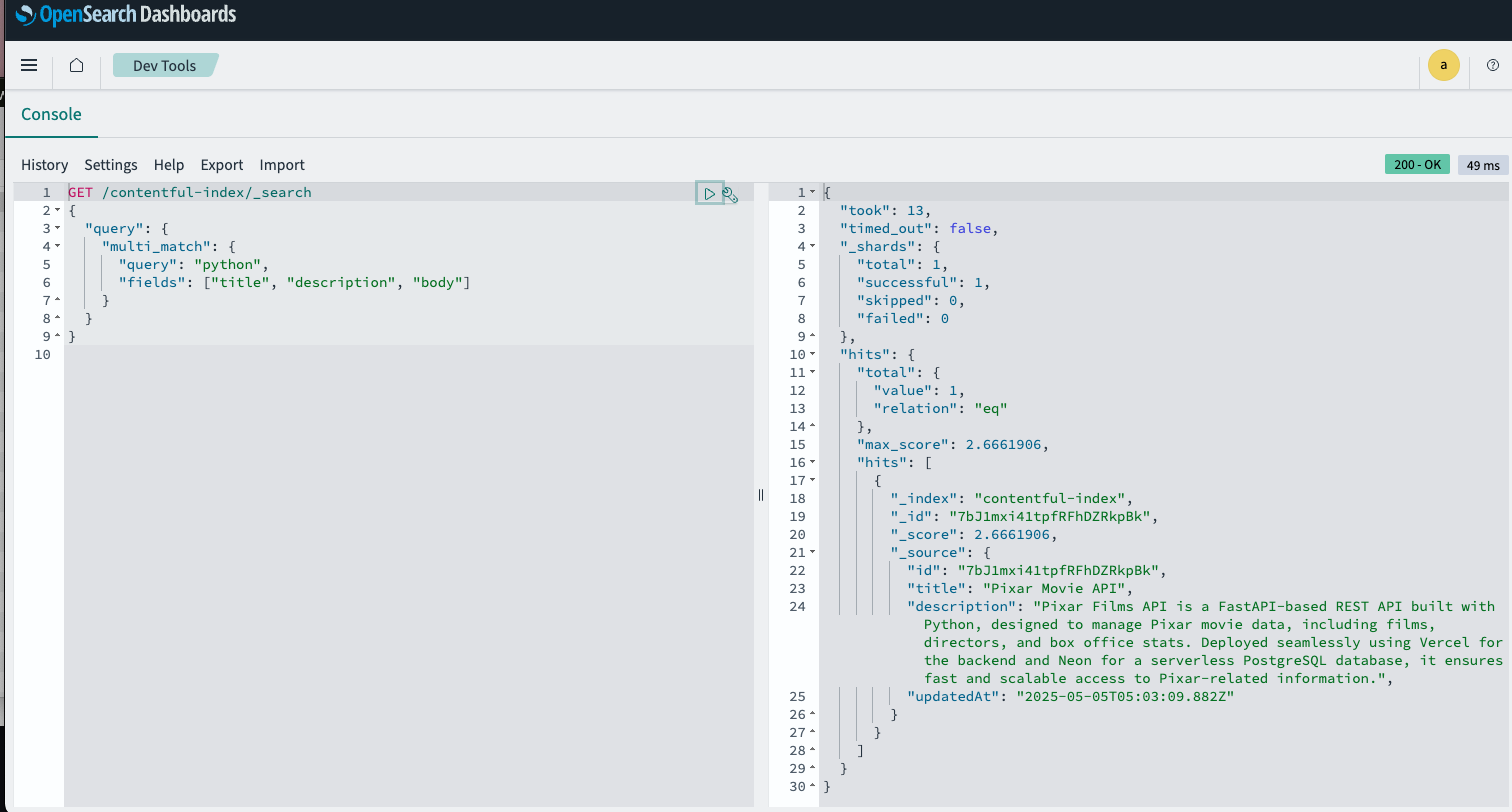
Navigate to http://localhost:5601/app/dev_tools#/console and run the following query:
GET /contentful-index/_search
{
  "query": {
    "multi_match": {
      "query": "{search term}",
      "fields": ["title", "description", "body"]
    }
  }
}
Here you will see the left pane is the search query and the right pane is the result of that query. It returned one hit or content asset matching the search query.
Troubleshooting
-
Remove conflicting containers:
docker stop opensearch opensearch-dashboards
docker rm opensearch opensearch-dashboards -
Check logs:
docker logs opensearch
docker logs opensearch-dashboards -
Ensure your
.envfile is correctly configured